¶ How to activate Trap mode on OLT Fiberhome
¶ 1. Check Current Trap Configuration
Access OLT Fiberhome via TELNET and apply the following commands to verify information entry:
Enter service:
cd service
Check that you have the entries with IP from the Made4OLT server:
show snmp trapreceiver
**Ex: **

**If there is no server IP entry as shown in the example above, you will need to add the server's IP with the following commands: **
set snmp trapreceiver add <IP-do-servidor> version v2c community Made4olt signaltrace_switch disable
Check which index is available and do the following:
cd ...
show startup-config module snmp
``` 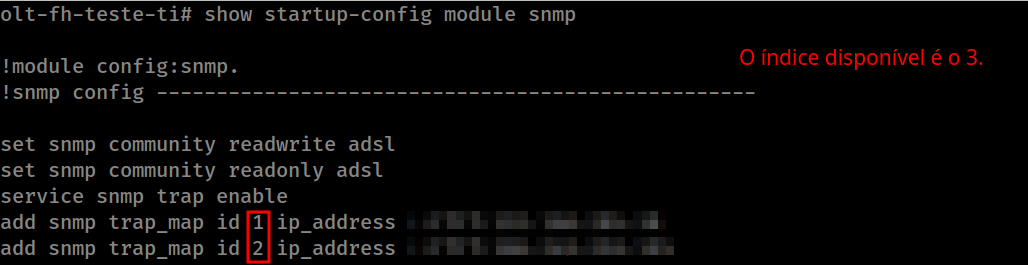 ```
add snmp trap_map id 3 ip_address <IP-do-servidor>
Check the version of the trap, to see if it is as stdformat:
show trap version
``` 
If you like ***privformat*** change to ***stdformat***:
set trap version stdformat
### Validation

 Once the commands have been applied, check again with the first commands listed and see if it has been added correctly.
show snmp trapreceiver
show trap version
Finally, all you have to do is save:
cd ..
save
This enables the trap mode in OLT Fiberhome.